
Free? How does that work?
Many people immediately wonder what the catch is when software is free. Will my data be sold, or will I suddenly get a bill later on? With ArtCraft, you don’t have to worry about that.
The package is open-source. That means the developers make the source code public instead of keeping it secret for profit. There’s no big software company behind it with demanding shareholders who want to make money off you every month. Programmers collaborate on these tools to create high-quality, accessible software for everyone. Because everything runs locally on your own computer, your files aren’t stored anywhere else or sold on to third parties. The software itself is and will remain free; you only pay if you choose IDEOMA’s professional services and support.
Who is ArtCraft for?
ArtCraft is aimed at designers, engineers, office workers, and IT managers who want to say goodbye to high licensing costs. The ecosystem is particularly appealing to:
- Technical Drafters & Engineers, for 2D CAD drafting (CADCraft).
- Estimators & Project Managers who want to view and edit PDF drawings (PdfCraft).
- Graphic designers, architects, and marketers who need professional raster, vector, and layout software for presentations and project visualizations (PhotoCraft, VectorCraft, DesignCraft).
- Anyone who works with documents, spreadsheets, and presentations (WordCraft, GridCraft, DeckCraft).
What does ArtCraft consist of?
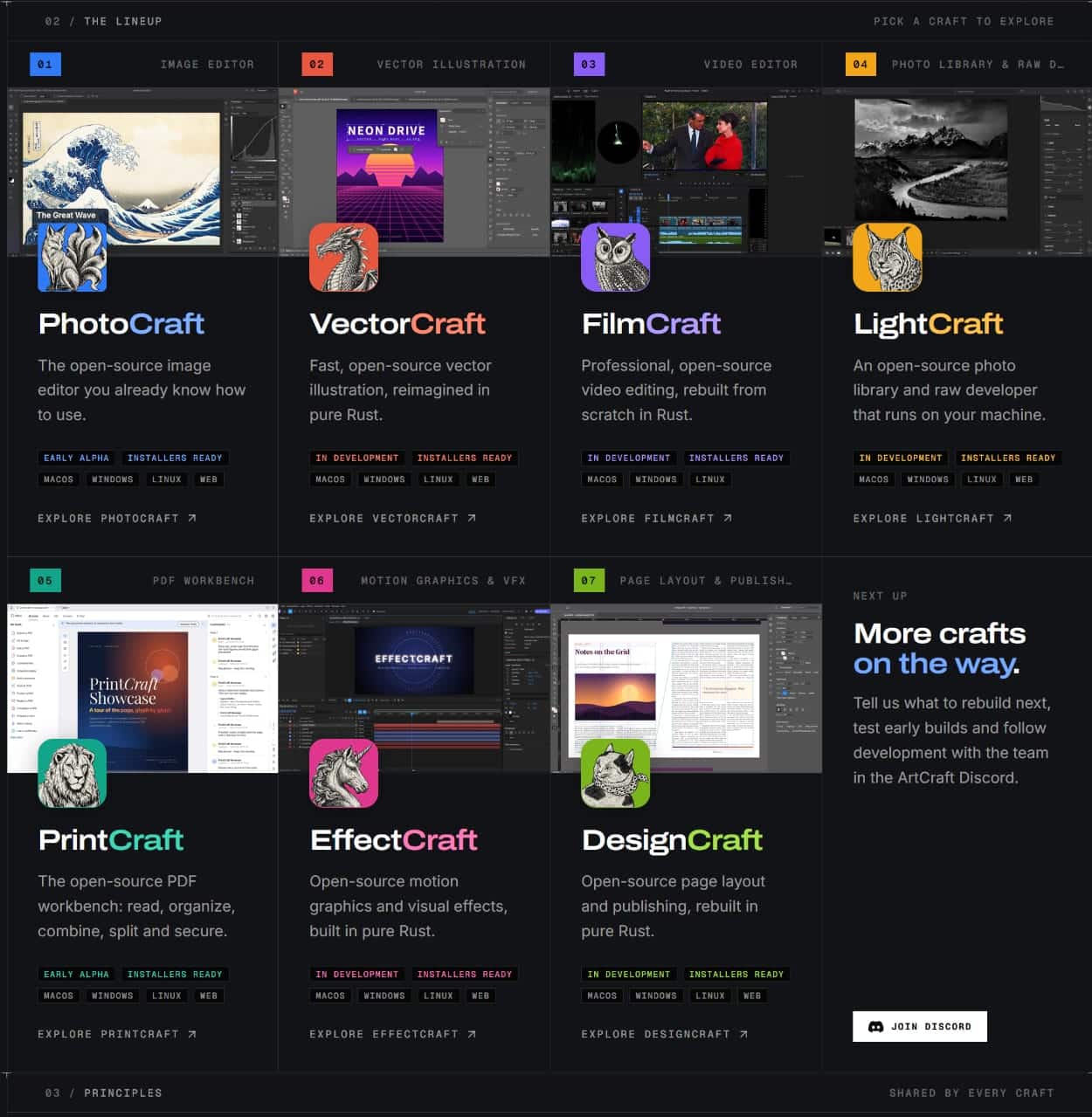
The ArtCraft suite currently consists of 17 native applications with familiar interfaces and keyboard shortcuts, based on well-known software programs. This allows you to get started right away. We’ve highlighted a few of them below.
- CADCraft: a free, open-source 2D CAD drawing program with native support for .dwg and .dxf files. It features familiar AutoCAD commands, layer management, and GPU acceleration.
- PdfCraft: a comprehensive PDF editor for opening, merging, editing, and annotating PDF documents and drawings. Similar to Adobe Acrobat.
- PhotoCraft & VectorCraft: powerful open-source alternatives to Adobe Photoshop and Illustrator for photo editing and scalable vector illustrations.
- DesignCraft & FigCraft: tools for clean page layout (an InDesign alternative) and interface design (a Figma alternative).
- WordCraft, GridCraft, and DeckCraft: fully open-source office applications for word processing, spreadsheets, and presentations. Similar to Microsoft Word, PowerPoint, and Excel.
- TextureCraft & MaterialCraft: specialized tools for creating 3D textures and procedural materials for 3D visualizations.
How do I download ArtCraft?
This video briefly explains how to get started with ArtCraft.
Need help?
At IDEOMA, we provide service and support regardless of where you purchase your software. Our core products have traditionally been Bluebeam, GstarCAD, GstarBIM, and CYPE, as well as similar products, such as open-source software (e.g., OpenAEC). We therefore have extensive knowledge in this area.
With this service, you can always contact us for questions, advice, training, installation assistance, administrative support, or other related matters. This is useful, for example, if you’re using free open-source software, or if you didn’t purchase your software from IDEOMA.
Of course, we’re also happy to help you decide between paid and free (open-source) software— with no obligation —and offer advice on the options that best suit your business. Please contact us for more information.
This webpage was last updated on November 12, 2026. For the latest updates, visit the ArtCraft website.